
Why Are My Google Ads Not Converting? A Complete Diagnostic Guide
You are spending money every day.
The clicks are coming in, the impressions keep climbing, but the phone is not ringing and the leads sheet is still empty.
If you typed “why are my Google Ads not converting” into Google at 11 PM while staring at a dashboard full of red numbers, you are asking the right question, and this article is built to actually answer it.
Most guides on this topic repeat the same ten bullet points: check your tracking, check your keywords, check your landing page.
That advice is not wrong, but it is incomplete, because it never tells you what these problems actually look like inside a real account, or in what order to fix them.
I am Pragati Saini, founder of DizUp Technologies, and over the past five plus years I have managed and audited Google Ads accounts spending anywhere from a few thousand dollars a month to well over a lakh a day, for clients across India, the UK, the US, Singapore, the UAE, and more.
Everything in this guide is drawn from that experience, including a few real, anonymized screenshots from accounts we manage, so you can see what “good” and “broken” actually look like on a live dashboard, not just in theory.
In-Depth Analysis Why Your Google Ads not Converting
The 7 Real Reasons Google Ads Don’t Convert
Here is the short version first, for anyone troubleshooting right now.
- Conversion tracking is broken, so real conversions are happening but not being recorded.
- The landing page does not match what the ad promised.
- Targeting is too broad, or aimed at the wrong audience entirely.
- Quality Score is low, quietly inflating cost per click.
- Bidding strategy was switched to automation before the account had enough data.
- The offer itself is weak or generic compared to competitors.
- Success is being measured by clicks and CTR instead of actual business outcomes.
The rest of this guide walks through each of these in detail, with the diagnostic order I actually use on client accounts.
Google Ads Not Converting: Pick One Reason At A Time
Start With Tracking, Not Targeting
Before touching a single keyword or bid, you need to confirm the problem is real and not a measurement gap.
If your tracking is broken, you could be converting perfectly well and still panicking over a dashboard that shows nothing.
I have seen clients ready to pause a genuinely profitable campaign purely because the conversion column read zero, when the actual issue was a tag that stopped firing after a site update.
-
The Conversion Tracking Checklist Most Advertisers Skip
Confirm that your Google Ads tag and your GA4 conversion event are not double counting, or worse, contradicting each other.
Confirm your primary conversion action is actually the outcome you care about, such as a purchase or a qualified lead form, and not a micro conversion like a newsletter signup that happens to be marked primary by default.
Check the “include in conversions” setting for every conversion action, since one wrong toggle here changes every optimization decision Google’s algorithm makes from that point forward.
Check for duplicate or missing tags on the thank-you page, especially after a site redesign, a new checkout flow, or a plugin update.
On a Singapore based ecommerce account we picked up, the developer had migrated the checkout to a new confirmation page during a redesign and never moved the conversion tag over.
The ads had been converting the entire time.
The dashboard simply was not seeing it, and once we moved the tag, reported conversions went from near zero to a stable daily count within 48 hours, without a single change to budget or targeting.
Clicks Are High But Conversions Are Not: What’s Actually Happening
A strong click-through rate feels like a win, and it often gets reported to clients or bosses as one.
But CTR measures curiosity about your headline, not intent to buy, and a high CTR paired with weak conversions almost always points to a mismatch between the ad’s promise and what the visitor actually finds.
On a UK based home services account, CTR sat above 9%, well ahead of the account’s historical average, while conversions stayed close to zero.
The ad promised a same-day emergency callout.
The landing page linked to a general services homepage, with no callout form above the fold and no visible phone number without scrolling.
People clicked because the headline solved an urgent problem, then left because the page made them search for the solution instead of handing it to them.
Once we rebuilt the landing page so the form matched the ad’s exact promise, and pinned a click-to-call button to the screen, conversion rate moved from under 1% to over 6% on the same traffic volume.
The takeaway holds across almost every industry: your ad and your landing page have to tell the same story, in the same words, or the click was wasted the moment it happened.
Here is a real example of one of my client’s campaign showcasing what a well-aligned, mature account looks like from the inside.
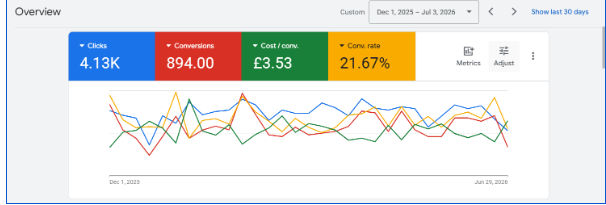
This UK account converts at 21.67%, well above the platform average for most industries, because the ad copy, the keyword intent, and the landing page all point at the exact same offer.
Landing Page Problems That Quietly Waste Ad Spend
The ad’s only job is to earn a qualified click. Everything after that click belongs to the landing page, and this is where most wasted budget genuinely hides.
-
Page Speed Is Costing You Conversions You’ll Never See
Paid traffic is less patient than organic traffic, because a visitor who arrived through an ad has not built any trust with your brand yet.
After compressing images, deferring non-critical scripts, and switching to a lighter template, your page’s load speed can drop to 3 second.
Cost per lead on the same campaigns, same budget, same keywords, dropped by roughly a third within two weeks, purely because fewer visitors were leaving before the form even rendered.
-
Trust Signals Are Missing or Buried Too Low
A visitor from a Google ad does not know your business yet, and they are being asked to hand over a phone number, an email address, or a card.
A landing page with no reviews, no certifications, no visible contact details, and no clear guarantee is asking for trust it has not earned.
This matters even more in finance, health, home safety, and legal services, where missing trust signals are frequently the single biggest reason for form abandonment, not the offer itself.
-
The Form Is Asking for Too Much, Too Soon
Every additional form field reduces completion rate, consistently, across almost every account we have tested this on.
A form asking for name, phone, and one qualifying question tends to outperform an eight-field form built to “pre-qualify,” even when the longer form seems smarter on paper.
If your Google Ads are not converting and your form has more than four fields, shortening it is usually the fastest fix available.
Targeting and Audience Mistakes That Drain Budget Quietly
Google Ads gives advertisers a large amount of targeting control, and most accounts use very little of it with any real intent.
-
Broad Match Without Enough Data Is a Guessing Game
Broad match combined with automated bidding can work well, but only once the account has enough conversion history to teach the algorithm what a real customer looks like.
Without that history, broad match in the first 30 to 60 days often becomes an expensive experiment, which is why newer accounts usually do better starting on phrase match and a carefully built broad match layer, backed by strong negative keyword lists.
-
Your Negative Keyword List Is Probably Empty
This is one of the fastest checks in any audit, and it is almost always neglected.
Search terms reports regularly reveal spend going toward searches like “free,” “jobs,” “salary,” “course,” or a competitor’s brand name, none of which was ever meant to be targeted.
A disciplined negative keyword list can increase the chances of your ad being converted, with no increase to the budget.
-
Check Your Demographics for Anomalies, Not Just Your Locations
One diagnostic that gets skipped constantly: open the demographics report and check whether “unknown” age or gender is unusually high, or whether one segment is spiking in a way that does not match your actual customer.
Sometimes this points to a genuine targeting problem, and sometimes, as one experienced practitioner discovered on a retiree-focused video campaign, a spike in an unexpected age bracket turns out to be the campaign working exactly as intended, just not the way the dashboard summary made it look at first glance.
Either way, you cannot know which one you’re looking at until you check.
-
Audience Signals Are Not Feeding the Algorithm
Feeding customer match lists, remarketing audiences, and “converted customer” segments into a campaign as observation audiences gives Google’s models a sharper picture of who to chase, instead of relying on keyword text alone.
Quality Score Is Quietly Setting Your Real Cost Per Click
Quality Score is one of the most misread metrics in the entire platform.
It is not a vanity number, it directly affects your CPC and your ad position, and a low score is frequently the reason cost per conversion looks unaffordable even when the offer itself is genuinely competitive.
-
Ad Relevance Has a Gap You’re Not Seeing
If the keyword is “affordable CRM software India” and the ad headline talks generically about “business software solutions,” Google reads a relevance gap, and so does the person searching.
Tightening ad groups so each one targets a small, tightly themed cluster of keywords, with headlines that echo the actual search term, is one of the highest leverage, lowest cost fixes available in the entire platform.
-
Old Ads Are Dragging the Whole Group Down
Ad copy written two years ago, before a rebrand, a pricing change, or a new set of testimonials, is often still live, quietly underperforming, and pulling the ad group’s Quality Score down with it.
Refreshing copy on a quarterly basis and pausing chronic underperformers is basic account hygiene that gets skipped constantly, especially in accounts managed in-house alongside a dozen other responsibilities.
Bidding Strategy Mistakes That Sabotage Conversions
-
Smart Bidding Turned On Too Early
Target CPA and Target ROAS are statistical models, and statistical models need real conversion volume to work with.
Switching a brand-new campaign to Target CPA with fewer than 15 to 30 conversions in the trailing 30 days is one of the most common reasons Google Ads underperform in newer accounts, because the algorithm does not yet have enough signal and starts bidding erratically.
My general approach is to start on manual CPC or Maximize Clicks to build clean data, move to Maximize Conversions once there is a real history, and only apply a strict Target CPA once that number is grounded in the account’s actual performance rather than a target pulled from a business plan.
-
The Target Number Itself Is Unrealistic
Setting a Target CPA far below what the account has historically achieved does not make Google find cheaper conversions, it makes the bidding engine pull back and shrink impression volume trying to hit a number it cannot reach.
Relaxing an unrealistic CPA target has, on more than one account, unlocked conversion volume that had been artificially suppressed for months.
-
The Budget Never Lets the Campaign Exit Learning Mode
Every significant edit, whether to budget, bid strategy, or major targeting settings, resets the campaign’s learning phase.
A thin daily budget combined with settings being changed every few days out of impatience means the campaign never stabilizes long enough to learn what actually converts.
Your Offer and Ad Copy Might Be the Problem
Sometimes the tracking is clean, the targeting is tight, and the landing page loads fast, and the answer to why the ads are not converting is that the offer itself is not compelling enough.
-
Generic Messaging in a Crowded Market
“Best quality, best price, trusted service” could describe almost any competitor in the same space.
“Same day AC repair in Sydney, no callout fee if we can’t fix it” tells a searcher exactly what they get, and removes their biggest objection in the same sentence.
-
No Clear, Low-Friction Next Step
A confused visitor does not convert.
If the ad copy and the landing page do not make the very next action obvious, whether that’s “Call Now,” “Get a Free Quote,” or “Start Your Free Trial,” most people leave rather than work it out themselves.
-
Competing Purely on Price Against Bigger Budgets
If price is the only differentiator, and a competitor with ten times the budget is bidding on price too, that is a fight most small and mid-sized advertisers were never built to win.
Positioning around speed, specialization, guarantees, or a specific niche inside the market tends to outperform a pure price war, almost every time we’ve tested it.
Here is a larger scale example of one of my client’s campaigns stating what happens once targeting, offer, and budget are all working together at once.
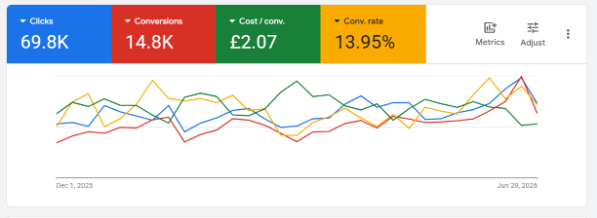
This account scaled past 69,000 clicks while holding a cost per conversion under £2.10, which only becomes possible once the tracking, the negative keyword list, and the landing page have already been fixed, in that order.
A Practical Framework: How I Diagnose a “Not Converting” Account
When a new client brings me this exact problem, I run the same structured sequence every time, rather than poking around the dashboard at random.
Step one: Verify tracking accuracy using Tag Assistant, GA4 real-time reports, and a manual test conversion.
Step two: Review the search terms report for the last 30 to 90 days to catch irrelevant traffic before anything else.
Step three: Check landing page experience on both desktop and mobile, including load speed, message match, and form friction.
Step four: Review Quality Score components at the keyword level, not just the account-wide average.
Step five: Confirm the bidding strategy matches the account’s actual data volume and maturity.
Step six: Audit the offer and ad copy against at least two direct competitors.
Step seven: Only after all of the above, look at budget and bid adjustments.
Most in-house teams and freelancers jump straight to step seven, which is exactly why the same conversation repeats every month without real progress.
When It Makes Sense to Bring in a Google Ads Expert
Running Google Ads yourself is entirely possible, and plenty of small businesses do it well for a long time.
There is a point, though, where the cost of continued trial and error outweighs the cost of proper management, particularly once monthly ad spend crosses a meaningful threshold for the business.
If tracking has been checked, targeting has been tightened, copy and landing pages have been refreshed, and conversions are still inconsistent, the issue usually sits in the interaction between several systems at once, tracking, bidding, creative, and page experience together, which is genuinely hard to isolate without daily hands-on account work.
This is the exact audit our team runs at DizUp Technologies, across Google Ads, Meta Advertising, AI-driven SEO, Content Marketing, and Google Business Profile optimization, because conversion problems rarely live inside just one channel.
Conclusion
If you came here asking why your Google Ads are not converting, the answer is rarely one single broken thing, it is usually a combination of tracking gaps, landing page friction, loose targeting, and a bidding strategy switched on before the account was ready for it.
Every one of these is fixable, and most of them do not require touching the budget at all.
Whether you run a local service business, a growing ecommerce store, or a B2B company chasing qualified leads, the framework stays the same: verify measurement first, tighten message match second, and only then start adjusting spend.
If you would rather have a certified Google Ads expert run this exact audit on your account instead of guessing your way through it, our team at DizUp Technologies, a Google Ads agency in India working with clients across the UK, US, Singapore, UAE, India, and more, can help.
We handle Google Ads management, AI-driven SEO, Meta Advertising, Content Marketing, and Google Business Profile optimization under one roof, built around real account data rather than templated advice.
Visit DizUp Technologies and book a free Google Ads audit, so we can find out exactly why your campaigns are not converting and get it fixed properly.
Frequently Asked Questions On Why Your Google Ads Are Not Converting
Why are my Google Ads getting clicks but no conversions?
This usually points to a mismatch between what the ad promises and what the landing page delivers, a tracking setup that is hiding real conversions, or traffic that is curious rather than ready to act.
How long should I wait before judging whether a Google Ads campaign is working?
Most campaigns need at least two to four weeks and a meaningful number of clicks to exit the early learning phase, though this varies by industry, budget, and how often settings are being changed.
Does a low Quality Score alone stop conversions?
Indirectly, yes, since a low Quality Score raises cost per click and can push ads into weaker positions, meaning less qualified traffic for the same budget.
Should I turn on Smart Bidding if my Google Ads are not converting?
Only once there is a reasonable, consistent conversion history, since applying Target CPA or Target ROAS too early on a low-data account frequently makes performance worse, not better.
What’s a good conversion rate for Google Ads?
It depends entirely on the industry and the offer, a 3% conversion rate can be excellent for a high-ticket B2B service and mediocre for a low-cost ecommerce product, so compare against your own historical baseline and industry benchmarks rather than a single universal number.
What is the fastest fix when Google Ads are not converting?
A full conversion tracking audit, in almost every case we’ve handled, since it tells you within an hour whether you have a real performance problem or a measurement problem.
About the Author
DizUp Technologies and a certified Google Ads expert with over five years of experience managing paid advertising campaigns for clients across India, the UK, the US, Singapore, and the UAE.
He has personally overseen millions of dollars in cumulative ad spend across ecommerce, real estate, home services, SaaS, and lead generation accounts, and specializes in diagnosing and fixing underperforming Google Ads accounts through structured, data-first audits.